728x90
HTML div 둥근 테두리 설정하기
이 포스트는 이전 블로그에서 이전된 포스트입니다.
1. 모든 모서리가 같은 모양의 둥근 테두리 설정

9행 : border-radius: 10px;
|
1
2
3
4
5
6
7
8
9
10
11
12
13
14
15
16
17
|
<head>
<style type="text/css">
.sample {
height: 150px;
width: 150px;
border-width: 2px;
border-color: #00F;
border-style: dotted;
border-radius: 10px;
}
</style>
</head>
<body>
<div class="sample">
</div>
</body>
|
cs |
2. 모든 모서리가 각각 다른 모양의 둥근 테두리 설정
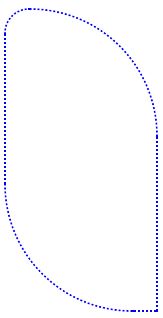
9~12행:
border-top-right-radius: 10em;
border-top-left-radius: 2em;
border-bottom-right-radius: 0em;
border-bottom-left-radius: 10em;
|
1
2
3
4
5
6
7
8
9
10
11
12
13
14
15
16
17
18
19
20
21
|
<head>
<style type="text/css">
.sample {
height: 300px;
width: 150px;
border-width: 2px;
border-color: #00F;
border-style: dotted;
border-top-left-radius: 2em;
border-top-right-radius: 10em;
border-bottom-right-radius: 0em;
border-bottom-left-radius: 10em;
}
</style>
</head>
</head>
<body>
<div class="sample">
</div>
</body>
|
cs |
위 4행은 아래와 같이 한행으로도 대체 가능합니다.
순서는 9~12행 순서대로 입니다.
|
1
|
border-radius: 2em 10em 0em 10em;
|
cs |
728x90
'기타' 카테고리의 다른 글
| Burp suite에서 hex 값 무작위 대입하기 (0) | 2022.01.07 |
|---|---|
| 암호없이 폴더 공유하기 (windows7) (0) | 2022.01.02 |
| 포토샵에서 테두리에 패턴배경 넣기(사선 패턴 배경) (0) | 2022.01.02 |
| HTML 링크 걸기 / 이미지 링크 걸기 (0) | 2022.01.02 |
| MFC Thread(쓰레드/스레드)에서 UpdateData() 함수 사용하기 (0) | 2022.01.02 |